Everything Google knows about your website.

Connect your Google account and turn raw Search Console data into a clear picture of your organic performance — every site, keyword, page, device, and country. No setup, no cost, no catch.

No credit card Official Google API Read-only access
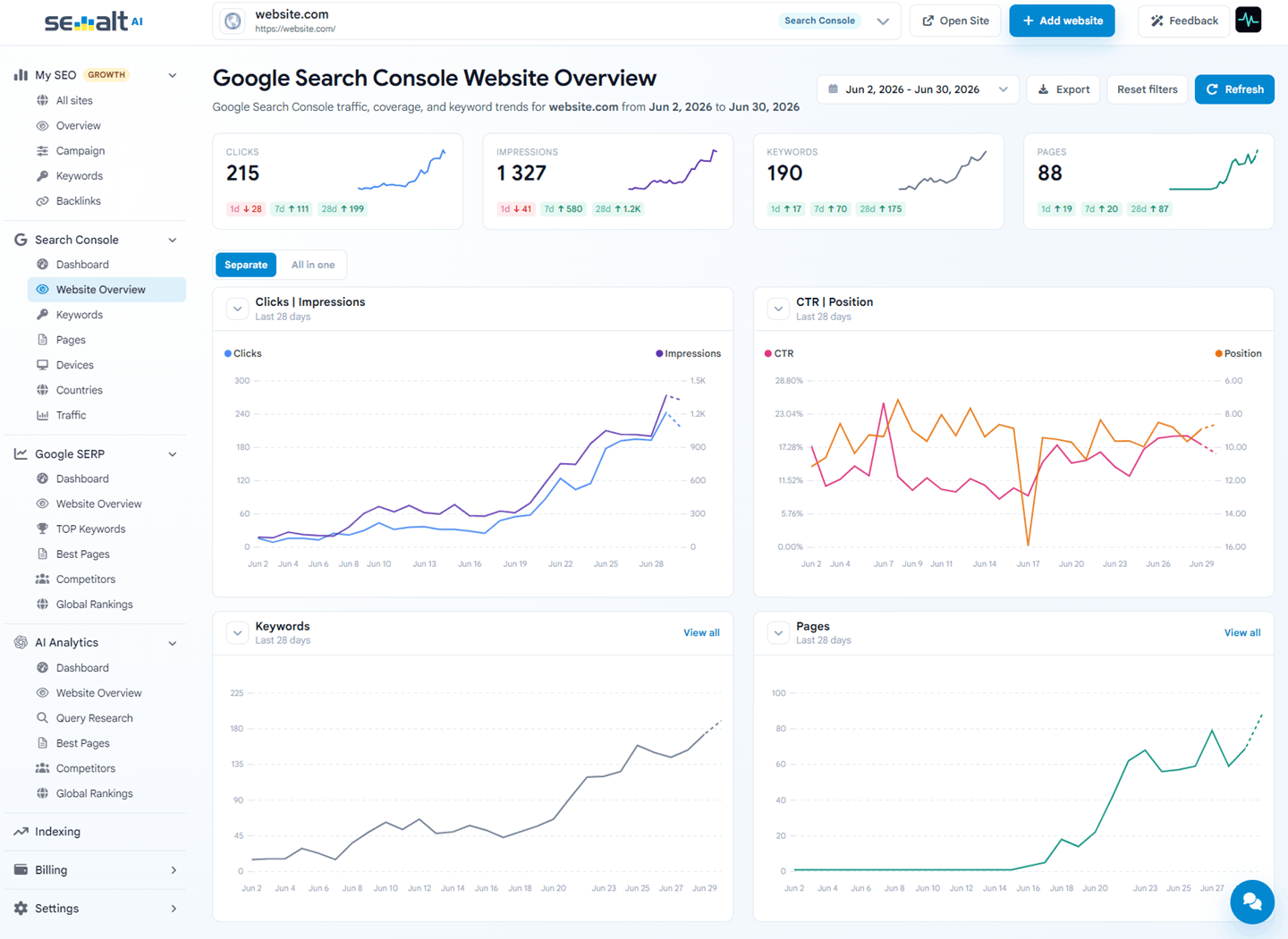
Semalt Google Search Console analytics dashboard with clicks, impressions, keywords, and pages trends
100% free No trial, no card, no feature gates
Official API Data straight from Search Console
Read-only We never touch your properties
All your sites One account, every property inside
Seven focused views

One console. Every angle of your search traffic.

Semalt splits Search Console into purpose-built views — dashboard, overview, keywords, pages, devices, countries, and traffic — so you open the answer, not a wall of filters.

Dashboard

All your sites in one command center.

Every property from your Google account, side by side — clicks, impressions, keywords, and pages with instant deltas. Even brand-new and zero-traffic sites stay visible, so nothing slips through.

  • Whole portfolio on a single screen
  • Sort and compare by any metric
  • Spot risers and fallers in seconds
Search Console · Dashboard 4 properties
T travelnotes.ioVerified 2.4K 18%
S shopwear.coVerified 941 6%
B bakerylane.comVerified 318 4%
L launched.todayAdded just now Collecting data… 0
Keywords & Pages

Every query and page, down to the detail.

Browse the exact keywords people type and the pages that win them. Filter by device, watch positions move, and catch new queries the first day your site ranks for them.

  • Top 1 / Top 3 / Top 10 buckets
  • First-time keyword detection
  • Clicks, impressions, CTR, and position per row
  • One-click CSV export
Keywords · Last 28 days Export
KeywordClicksCTRPos.
best running shoes 2026 482 4.1% 3 2
trail shoes for beginners New 217 3.4% 5 4
waterproof running shoes 164 2.8% 8 1
running shoes for flat feet 91 2.2% 12
Top 10 Top 3 Top 1 First time
Devices · Countries · Traffic

Know where — and how — people find you.

Split performance by desktop, mobile, and tablet, compare countries at a glance, and follow long-term traffic trends with ranges from today all the way back to 16 months.

  • Device split for every metric
  • Country-level clicks, CTR, and position
  • Ranges from today to 16 months
Devices & Countries Last 28 days
Desktop 54%
Mobile 41%
Tablet 5%
US United States 1.2K clicks
GB United Kingdom 640 clicks
DE Germany 385 clicks
Beyond raw data

The numbers Search Console never shows you.

Google gives you totals. Semalt turns them into movement — how many keywords you rank for, how many pages bring traffic, and how it all changed while you slept.

  • Keyword and page counts, charted Watch how many queries and pages bring you traffic over time — a trend Google never draws for you.
  • 1-day, 7-day, 28-day deltas Every metric ships with instant change chips, so "what happened?" takes one glance, not a spreadsheet.
  • Charts, separate or all-in-one Overlay clicks, impressions, CTR, and position on one canvas — or study each line on its own.
  • Export-ready reporting Take any table or chart to CSV for clients and teammates in one click.
Open your free console
Daily movement · website.com Synced
Clicks 215
1d 28 7d 111 28d 199
Impressions 1,327
1d 41 7d 580 28d 1.2K
Keywords 190
1d 17 7d 70 28d 175
Connected in minutes

From Google account to insight in three steps.

No code, no DNS records, no tags on your website — if a property is in your Search Console, it's ready for Semalt.

  1. 01

    Sign in with Google

    Authorize read-only access to Search Console. You can revoke it from your Google account at any time.

  2. 02

    Pick your properties

    Choose one site or your entire portfolio — Semalt pulls up to 16 months of history right away.

  3. 03

    Read the story

    Open the dashboard, keywords, pages, devices, countries, and traffic views — and export anything you need.

Good questions

Free usually has a catch. This one doesn't.

Straight answers about how the free Search Console analytics works — and what it means for your data.

Try it yourself
Is it really free?

Yes. Search Console analytics is a free part of the Semalt platform — no trial period, no credit card, no feature gates. We earn on optional SEO campaigns, not on your analytics.

Can Semalt change anything in my Search Console?

No. Semalt requests read-only access to the official Google Search Console API. We can't edit, submit, or remove anything in your properties — and you can revoke access from your Google account whenever you like.

How much history do I get?

Up to 16 months — the maximum the Search Console API provides. Pick any range from today back to 16 months: last 3 days, 28 days, 6 months, or the full window.

How fresh is the data?

Semalt syncs with Search Console continuously and shows new data as soon as Google publishes it. Google itself finalizes search data with a short delay — typically a day or two — and Semalt picks it up the moment it lands.

I manage many websites. Will this scale?

That's what the dashboard view is for: every property from your Google account side by side, including fresh and zero-traffic sites. Agencies use it to scan an entire portfolio in seconds instead of switching properties one by one.

What happens when I want more than analytics?

Your console lives next to the rest of Semalt — Google SERP rank tracking, AI visibility analytics, fast indexing, and managed AutoSEO and FullSEO campaigns. Everything is one click away in the same workspace, whenever you're ready.

When the data says "push here"

Analytics is free. Growth is one click away.

The moment your Search Console shows an opportunity, launch a managed SEO campaign without leaving your workspace.

Google has been keeping notes on your website. Start reading them.

Connect your Google account and get the full Search Console picture — clear, organized, and free forever.

Get your free analytics
